Save 10% Below $1,000 · Save 15% Above $1,000

End-of-Semester Sale

Hot
New
Out stock

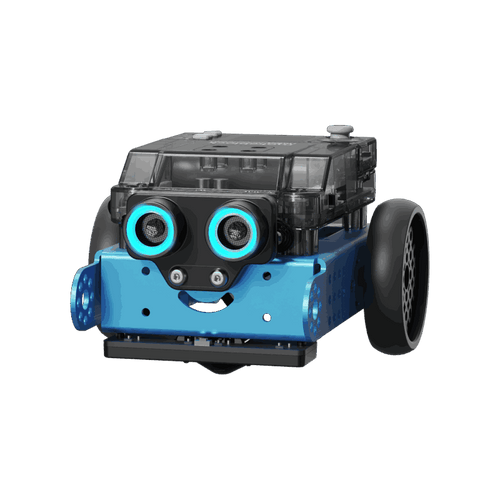
Makeblock mBot: Kid's First Robot Kit for DIY and STEM Learning

$69.99$88.99
Earn up to 10% cash back. Join Now.
Icon/Attributes/ages
6+
Ages
Icon/Attributes/Ready-to-learn
8+
Ready-to-learn projects
Icon/Attributes/Code-to-play ways
25+
Code-to-play ways
Icon/Attributes/Max playing time
1 hrs
Max playing time
Icon/Attributes/Building methods
1
Building method
Blue
Pink
mBot

$69.99

$88.99

Contains Makeblock mBot Robot
  • Makeblock mBot

mBot2

New Model with Free Coding Box

$149.99

$177.99

Contains Makeblock mBot2 Coding Robot Pack

mBot + Coding Box

Top Pick! Easy Coding Learning

$79.99

$99.99

Contains Makeblock mBot Robot, and mBot Coding Box
  • Makeblock mBot
  • mBot Coding Box: Step-by-Step Tutorials and Projects for Easy Coding Learning

mBot + Bluetooth Dongle

$79.99

$99.99

Contains Makeblock mBot Robot, and Bluetooth Dongle
  • Makeblock mBot
  • Bluetooth Dongle: Enhance Bluetooth Connectivity for PC

mBot + Add-on Packs*3

$149.99

$196.99

Contains Makeblock mBot Robot, and 3 Different Add-on Packs
  • Makeblock mBot
  • 3 Different Add-on Packs: Unlock 9 More Building Ways for Endless Fun

Click here to learn more about using a Purchase Order (PO).
Icon/Attributes/Free shipping Shipping From 6/10
Safe & Secure Checkout
Pay Image
Pay Image
Pay Image
Ship in 2 Business Days with Trusted Delivery
We are currently only able to deliver products to the contiguous United States.
If you want to purchase products and deliver outside of the US, we will forward your request to our local distributors to serve you.  Please leave your details.
There is a newer model of this item:
Makeblock mBot: Kid's First Robot Kit for DIY and STEM Learning

Makeblock mBot: Kid's First Robot Kit for DIY and STEM Learning

$69.99 $88.99

Applications close 2024/09/30

Qualify for ESSER Funding

Enhance STEAM learning with ESSER Funds.Educators can invest in technology like Makeblock to foster students’ curiosity, innovation, and growth.
Learn More to Apply>

$100,000 Funding from Makeblock.jpg__PID:263e63df-6f31-4e5a-8b51-bf6654e71d8a$100,000 Funding from Makeblock.jpg__PID:a193c799-06cc-4e44-98fc-d492ae325b04

3 Steps to Use Easily

3 Steps
to Easy Use

Step1_ Unbox & Build.jpg__PID:6959d297-d577-43a8-8e06-b8b695e88547

Step1: Unbox & Assemble

Open the box and watch their excitement as they build their new mBot!

Check out 4 robot forms >
Step2_ Play.jpg__PID:59d297d5-7793-48ce-86b8-b695e88547b4

Step2: Play with the App

Download the app and guide mBot through fun challenges to keep them engaged.

Check out programming activities >
Step3_ Code.jpg__PID:d297d577-93a8-4e06-b8b6-95e88547b45c

Step3: Learn to Code

Introduce coding by programming mBot, letting them see their ideas come to life!

See how to play >

Supporting You All the Way with
Easy-to-Use Softwares

Gamified Coding.jpg__PID:8a7a6494-7d3f-47bd-bc95-27c57124b3f1Gamified Coding.jpg__PID:f1bf3df6-050c-420f-81f0-69945e5068f8
Fun-filled Playing.jpg__PID:018a7a64-947d-4f77-bd3c-9527c57124b3Fun-filled Playing.jpg__PID:b3f1bf3d-f605-4cc2-8f81-f069945e5068Easy Assembly.jpg__PID:2c018a7a-6494-4d3f-b7bd-3c9527c57124Easy Assembly.jpg__PID:24b3f1bf-3df6-450c-820f-81f069945e50

Rich Learning Materials

Cater to diverse learning styles of next generation of coders

Projects-mBot.webp__PID:88142ff5-c5a4-46d1-af26-3a844192e204

12+ Free Basic Courses

Lessons plan and hands-on activities included

Master mBot programming from 0 to 1 with gamified STEM activities. Getting started in computer science? It's not hard at all.

Activities-mBot.webp__PID:a6b92c16-af60-4d0e-9d68-04afcff85721

8+ Free Learning Cases

Animated GIFs guide included

Suitable for hands-on explorers. In task-oriented environments, learn coding and robotics by doing.

Download >

Learn More about Each Coding Projects

Need additional purchases

coding games for kids

Meet Your mBot

Get hands-on with programming and controlling a robot via the Makeblock app, opening up exciting opportunities for exploration and customization.

coding books for beginners

Control mBot like a TV set

Explores programmable remote controllers and basic programming frameworks, empowering users to unlock the full potential of remote-controlled robots.

coding games for kids

mBot's Eyes - Ultrasonic Sensor

Delves into ultrasonic sensors, applying lighting control to showcase their potential in creating dynamic, interactive environments.

best coding games for kids

Make mBot follow a line

Embark on a journey of discovery as the project unravels the principles and applications of line-following sensors, showcasing real-world scenarios and driving learning interest.

Meet Your mBot

Create a customized robot by inputing commands to make it complete obstacle avoidance, line following, and sensor application. Create video games by programming and play them through a series of fun interactions with CyberPi!

Control mBot like a TV set

Create a customized robot by inputing commands to make it complete obstacle avoidance, line following, and sensor application. Create video games by programming and play them through a series of fun interactions with CyberPi!

mBot's Eyes - Ultrasonic Sensor

Delves into ultrasonic sensors, applying lighting control to showcase their potential in creating dynamic, interactive environments.

Make mBot follow a line

Embark on a journey of discovery as the project unravels the principles and applications of line-following sensors, showcasing real-world scenarios and driving learning interest.

Learn through Play with Beginner-friendly mBot

Frame 1329131260.jpg__PID:a8c431b9-ada6-4bdb-ada6-5019b22a5e7b
robot for kids

Have tons of fun building and learning

programmable robot for kids

Easy-breezy coding learning experience

build your own robot kit

Get ready for fun-filled robot playtime

Frame 1329131243.jpg__PID:3a14611f-c1e2-4e82-9947-7e89f2e4aebd

Let creativity fly with DIY projects

Funding Your Educational Program

Title I, Part A Improving Basic Programs Operated by Local Educational Agencies (LEAs)

Makeblock Education offers versatile tools for all learning styles. Students engage in practical, hands-on activities, while teachers get creative with STEAM subjects. Makeblock fosters interdisciplinary thinking by connecting science, engineering, reading, and math.

Learn More >

Title IV, Part A Student Support and Academic Enrichment

The nation's future depends on a comprehensive education that equips students for a globalized world. Makeblock Education solutions integrate all subjects and offer innovative methods to cultivate 21st-century skills like creativity, communication, collaboration, and critical thinking.

Learn More >

National Science Foundation (NSF) Grants

Makeblock Education offers hands-on STEM learning solutions that align with NSF grant goals. By providing a dynamic and engaging approach to teaching and learning, our products foster students' creativity, critical thinking, problem-solving skills, and design thinking in the exploration of real-world STEM applications.

Explore Now >

We support school purchases via PO.

User Story

coding games for kids learning robotics and coding

Learn Coding and Robotics with mBot

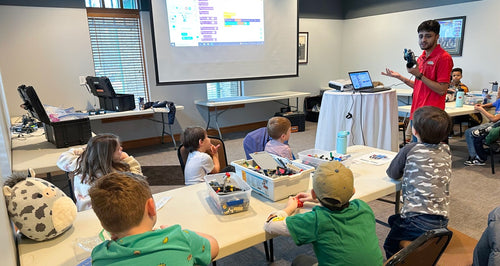
During STEM Monday, students from the Purple Band (Secondary Level) had a productive day working with mBot on coding their bots and enhancing their existing bots with add-on packs. They are excited to share their newfound knowledge and experiences with peers.

Product Reviews

Highlights

Robotics & Building Quality
precise motion controls

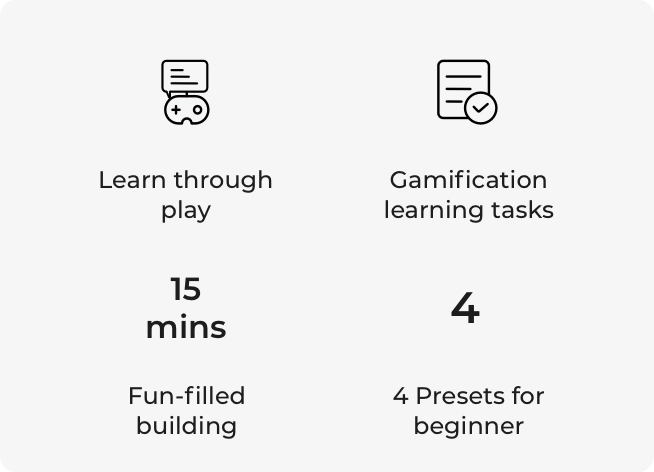
Learn through play

emotion expression

Gamification learning tasks

speech recognition

Fun-filled building

fun-filled building

4 preset programs

Coding Experience

mblock coding software

Free use of coding software

block based coding and python

Coding languages

Durable Performance

aluminum alloy

Aluminum alloy

coding playtime

Max play time

Rich Add-on Packs

Makeblock_mBot_Interactive_Light___Sound_Robot_1_625x.progressive.webp__PID:e1bf8825-99e9-483b-9912-9260c646751c
mo_mBot Interactive Light & Sound Robot 3-in-1 Add-on Pack for mBot (1).jpg__PID:038ee1bf-8825-49e9-b83b-19129260c646
Makeblock_mBot_Interactive_Light___Sound_Robot_1_625x.progressive.webp__PID:e1bf8825-99e9-483b-9912-9260c646751c

mBot Interactive Light & Sound Robot 3-in-1 Add-on Pack

Transform your mBot to “Light chasing robotx”, “Intelligent desk light”, “Scorpion robot” or anything you can imagine. (mBot Not Included)

mBot Interactive Light & Sound Robot 3-in-1 Add-on Pack for mBot (1).jpg__PID:9e038ee1-bf88-4599-a9f8-3b19129260c6

Upgrade to Next-Gen mBot

We believe in presenting comprehensive information to empower you to make informed decisions
Comparison_mBot2 (1).png__PID:5be613b4-95d0-42c1-a0db-9ac083f2a8ce

Product


Interactive Ways 

Learning Resources

Programming Languages

Applications

mBot Neo.png__PID:c5935d6c-e798-4994-9d9d-2e8ba552479f

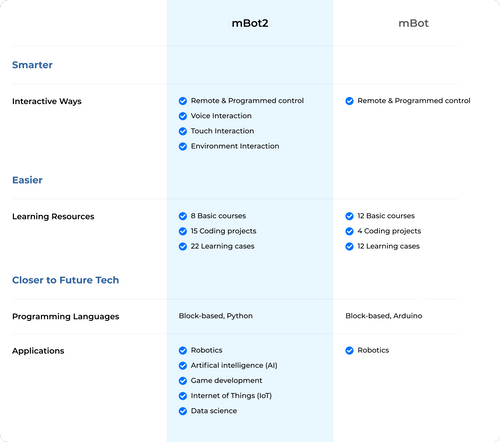
mBot2

Remote & Programmed control

Voice Interaction

Touch Interaction

Environment Interaction

8 Basic courses

15 Coding projects

22 Learning cases

Block-based, Python

Robotics

Artifical intelligence (AI)

Game development

Internet of Things (IoT)

Data science
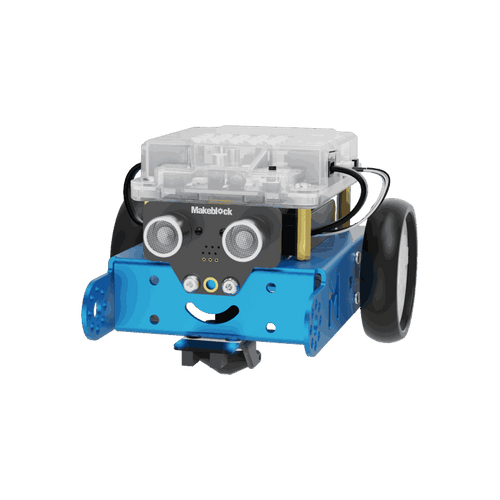
mBot (2).png__PID:5dc5935d-6ce7-4819-941d-9d2e8ba55247

mBot

Remote & Programmed control

12 Basic courses

4 Coding projects

12 Learning cases

Block-based, Arduino

Robotics

What's Included

what is included in mbot neo coding robot kit

Electronic components

Building components

Other components

Learning resources

Coding Project

Product Specifications

Mechanical materialAluminum alloy
Main control
mCore
Process clock speed
16MHz
Onboard sensor
Buzzer, light sensor
Other sensors
Ultrasonic sensor, IR emitter, line follower sensor/color sensor
Coding language 
Block-based, Arduino
Battery (Not included)4 AA batteries or 3.7V rechargeable LiPo battery
Battery capacity
1800 mAh
Playtime≈1 hour
Charging time
3–4 hours
Rotational speed
200 RPM ± 10%
Maximum external electronic modules  
2 motor & servo ports 4 sensor ports
Communication mode
USB, Bluetooth, 2.4G
Compatibility500+ makeblock electronic & mechanical parts, LEGO bricks

Let's Answer Your Questions

{"statementLink":"","footerHtml":" ","consistentHelpData":[],"hideMobile":false,"hideTrigger":false,"disableBgProcess":false,"language":"en","position":"left","leadColor":"#146ff8","triggerColor":"#146ff8","triggerRadius":"50%","triggerPositionX":"right","triggerPositionY":"bottom","triggerIcon":"people","triggerSize":"medium","triggerOffsetX":20,"triggerOffsetY":20,"mobile":{"triggerSize":"small","triggerPositionX":"right","triggerPositionY":"bottom","triggerOffsetX":10,"triggerOffsetY":10,"triggerRadius":"50%"}}